

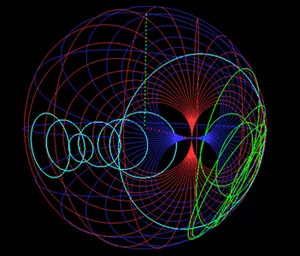
3D Smith Chart
The 3D Smith Chart is the first commercially available software tool that enables new capabilities for RF/microwave designers that were not available using the original Smith chart introduced in 1939. First proposed in 2011, the 3D Smith Chart can represent both active and passive microwave circuits on a spherical plot. Using the mathematical concept of the Riemann sphere, the extended reflection coefficient plane is transformed into the surface of the unit sphere. Since the 3D Smith Chart compiles the whole complex plane, all possible loads can be plotted on the chart, which is not possible on the traditional Smith chart. Lossy lines with complex characteristic impedances can also be represented.
MDL’s Reflectometer Calculator
The Reflectometer Calculator allows engineers to input any one of three known values, (Reflection Coefficient (p), VSWR or Return Loss), to quickly convert to the other unknown values. This tool allows the user to put their System or Component’s performance in perspective. Users can quickly convert to numbers they are comfortable using to determine the System or Component’s RF efficiency. The calculator will even provide engineers with a window of uncertainty for measurements taken with less than perfect systems (Coupler Directivity).
MDL’s Rigid Waveguide Slide Rule
To simplify specifying a waveguide product, the slide rule shows different flange types in terms of material selection, such as brass or aluminum, and also shows the pertinent MDL model number for the different flange choice. The slide rule changes values instantly when another waveguide size is selected, allowing users to quickly browse through different waveguide sizes and designations to find the transmission line that is suitable for their application.
TX_LINE: TRANSMISSION LINE CALCULATOR
NI/AWR Corporation
TX-LINE® is a FREE, easy-to-use, Windows-based interactive transmission line calculator for the analysis and synthesis of transmission line structures. TX-LINE enables users enter either physical characteristics or electrical characteristic for common transmission mediums such as:
- Microstrip
- Stripline
- Coplanar waveguide
- Grounded coplanar WG
- Slotline
TX-LINE runs on Microsoft® Windows® 2000-SP4, XP-SP2, Vista-SP1, and Windows® 7
Download Windows Version Here
Download Your FREE Copy of TX-LINE iPhone App
Remcom Forum
The forum offers many uses and benefits, including:
*Collaborative help resource
*Method to easily make suggestions and feature requests
*Intelligence and data source that will influence Remcom’s product development plans
*Community where current and potential customers can connect and engage with Remcom’s team
*Tool for crowd sourcing to vet new product ideas or conduct polls
Membership in the community is free and provides access to post topics, comment on others’ posts, upload content, and more.
Microwave Impedance Calculator
Rogers Corporation
This software is intended to assist with microwave circuit design in predicting the impedance of a circuit made with Rogers High Frequency circuit materials. The software also has some capabilities for predicting transmission line losses as well. The software is available from Roger's Technology Support Hub. Creating a new account takes about 1-2 minutes. Once created you will have access to all the features listed below. Additionally, you can configure your account to receive updates and information regarding Rogers' materials.
Microwave Impedance Calculator
TRL Calculator
Electro-Photonics
TRL (Thru, Reflect, Line) remains one of the most popular alternative calibration methods for measuring non-coaxial devices to the traditional short, open, load, and thru (SOLT), two-port error correction calibration method. TRL calibration is based upon an 8-term error model and uses three standards - thru connection, high reflectivity termination, and a section of uniform line (λ/4 longer than the thru line at the center frequency). The electrical length of the line is determined during the calibration and does not need to be known. The characteristic impedance, Z0 of the delay line is the only critical parameter.
Variations of the TRL calibration method are:
• LRL = Line, Reflect, Line
• TRM = Thru, Reflect, Match
• LRM = Line, Reflect, Match
The code for our calculator is based on the Agilent AN 1287-9 application note published in 2006.
Filter Wizard
K & L Microwave
K&L Microwave's Filter Wizard software simplifies the selection of the right filter product for your application from a vast number of available designs. Provide the Filter Wizard with your desired specifications, and the software will return a list of products that match. If the Filter Wizard selection algorithm cannot match the criteria specified, you will be forwarded to our quote request page. Choose the Filter Wizard link to begin specifying and selecting a filter or the products link for more information.
Mixer Spurs Calculator
A new method for mixer spurs calculation has been developed which is easier and more straightforward to use than the traditional spurs chart approach when dealing with the frequency plan optimization in broadband double conversion transceivers suitable for applications as multi-band, multi-standard and Software Defined Radio. A full technical article describing this new method can be found here.
An Excel spreadsheet calculator for this method can be downloaded below.
AppCAD
The following RF design software is provided free of charge as a service to the RF and microwave design community.
Download installation file for AppCAD 3.0.2
-
File name: "setup.exe"
- File size: 14.5 MB (14,491,753 bytes)
- Description: AppCAD Version 3.0.2
Instructions: Download "setup.exe" to any convenient subdirectory on your HDD. After downloading, double click this executable file from your Windows Explorer to automatically install AppCAD.
AccelWare
This Unit Conversion Tool is a powerful, intuitive, and easy-to-use utility for quick and accurate conversion between almost every possible unit of measure, from one system to another. The latest version includes more than 2200 units in 78 categories. The categories include: length, area, speed, mass, numbers, volume, time, density, force, pressure, energy, power, flow, temperature, angle, light, fractions, data transfer, and many more. Fully functional Online version now available.
AlphiMAX P2P Signal Propagation Calculator
Determine whether a wireless link will work given the specific locations you are trying to connect, prior to purchasing equipment or climbing a tower. The Point-To-Point Estimator is a free web based tool with a very nice graphical interface tools that enables you to compare manufacturers, while taking into account the terrain of your area, terrain type, climate, antenna type, define fade margin and more. Use of a GPS database produces a very accurate elevation profile between antenna locations.
Antenna Design Calculator
The antenna calculator is a simple but very useful piece of software available to install under Windows 9x/ME/2000/XP and Linux. The upper section relates antenna diameter and frequency to gain and beamwidth. Using the scroller, set the beamwidth against the 3 dB or 10 dB marker, and read off the corresponding frequency and diameter; or set the frequency against the diameter and read off the beamwidth.
CB / Amateur Radio Antenna System Evaluator
This JavaScript program evaluates the performance of your antenna system, computing the consequences of SWR and feedline loss, quad antenna and dipole inverted V Antenna design Calculators.
Quad Antenna Design Calculator (a javascript html)
Dipole Inverted V Antenna Design Calculator (a javascript html)
Besser Associates - dB Calculator
dB, or Decibels always refer to the ratio between two numbers. For example, when one signal is 3dB stronger than another signal, that means that one signal is twice as powerful as another signal. The ratio of the power level of the stronger signal to that of the weaker signal is 2 to 1. Also Reflectometer, Butterworth filter, DBM to DbW calculator applets and Smith Chart Matching.
Broadcast Engineering Calculators
These programs are written using HTML and JavaScript and will execute from within an internet browser. JavaScript calculators include: AM Common Point / Antenna Current Calculator, FM Transmitter Power Output Calculator, RPU/STL Transmitter Frequency Tolerance Calculator, AM Transmitter Harmonics Calculator, Free Space Loss Between Isotropic Radiators Calculator, 0.6 First Fresnel Radius Zone Calculator, VSWR Calculator, Coaxial Cable Loss Calculator, Coax Cable Loss/Antenna Gain Calculator, and Op amp Gain Calculator.
AM Common Point / Antenna Current Calculator
FM Transmitter Power Output Calculator
RPU/STL Transmitter Frequency Tolerance Calculator
AM Transmiter Harmonics Calculator
Free Space Loss Between Isotropic Radiators Calculator
0.6 First Fresnel Radius Zone Calculator
Dielectric Lab
DLI’s web based CapCad capacitor modeling software was developed to provide customers with an easy to use and readily accessible comparison tool for choosing the best Single-Layer, Multi Layer or Broadband Blocking capacitor to suit the customer’s needs. CapCad includes SPICE models with values that reflect typical performance at the chosen frequencies and temperatures that are of importance to an application. The user also has the ability to plot 2-port Scattering Parameters, Impedance, Q Factor or Equivalent Capacitance over any frequency span from 1 MHz to 40 GHz while maintaining the ability to adjust the temperature and note how it may affect the performance. CapCad also includes a Smith Chart utility and the ability to copy the S-Parameter data in touchtone format (s2p).
RF Passive Design Calculators
This is a large selection of online interactive calculators for RF design, including attenuators, capacitance, resonance, RF traps, and microstrip impedance. Design, development and small scale manufacture of simple RF and Audio items. The calculators supplied courtesy of Chemandy Electronics are designed to be easy to use and follow a common theme and layout where possible.
Coplanar Waveguide With Ground Calculator
Matching Pi Attenuator Calculator
Matching T Attenuator Calculator
Microstrip Characteristic Impedance Calculator
Based on a formula by Brian C Wadell. Used for calculating the Zo of PCB transmission lines, showing the formula used.
Microstrip Characteristic Impedance Calculator
Active calculator using a formula from an article by Rick Hartley, showing the formula used.
Microstrip Characteristic Impedance Calculator Using the IPC-2141 Formula
Active calculator using a formula from an article by Polar instruments, showing the formula used.
Rectangular Capacitor Calculator
Relative Dielectric Constant Calculator for a Circular Capacitor
Return loss and mismatch loss Calculator
RF Inductor Comparison Tool
Coilcraft
This interactive online comparison tool for RF inductors replaces manual methods and helps prevent false starts in the design of new microwave and RF circuits. The user enters his/her operating frequency between 1 MHz and 3 GHz, then selects up to four inductors to compare using pull-down lists to pick the product series and inductance value. The results screen provides a table showing specifications for each part at the user’s own operating frequency: inductance, Q factor, impedance and equivalent series resistance (ESR). Below that, these same parameters are graphed to show performance over the 1 MHz to 3 GHz frequency range. Each part is plotted in a different color to make it easy to distinguish. And because they all appear side-by side on the same grid, it’s easy to quickly spot the best performer at any frequency.
Antenna System Designer
The Connect802 Antenna System Designer™ is an on-line calculator that creates a wireless network antenna system link budget design report based on various parameters that you provide. It will help you predict end-to-end performance and evaluate your network design when you plan a point-to-point, or point-to-multipoint outdoor wireless network deployment. You'll be able to analyze the radio link and tune network parameters for optimal link suitability. Plus, you'll get an idea of the wireless network design considerations (including Wi-Fi design considerations) that the Connect802 planners take into consideration when creating a wireless network design.
Main Page/Table of Contents
Main page, table of contents explaining all the potentially obscure values needed to run the Connect802 Antenna System Designer. You only need to supply the distance for the proposed wireless link, or the antenna tower height, or heights.
Electronic Design Calculators
A substantial collection of dedicated electronic design calculators from Daycounter Inc., a rapid product development services company that caters to small and medium sized companies.
-
Passive Component Properties
- Air Core Inductor Coil Inductance Calculator
- AWG (American Wire Gauge) Diameter and Resistance Chart
- Capacitor-Energy-Time-Constant-Calculator
- Coil Physical Properties Calculator
- Inductor Stored Energy Calculator
- Parallel Resistance Calculator
- Parallel Resistor Combination Calculator
- Plate Capacitor Capacitance Calculator
- Reactance Calculator
- RMS and Average Calculator
- Standard Resistor Value Calculator
- Steinhart-Hart Thermistor Calculator
- Straight Wire Inductor Calculator
- Solenoid Force Calculator
- Thermal Noise Calculator
- Voltage Divider Calculator
- Voltage Summer Calculator
- WheatStoneBridge Calculator
- Series - Parallel Impedance Conversion Calculator
-
RF
- Complete RF Amplifier Design and Analysis Calculator
- Decibel Calculator
- FriisPath loss Calculator
- Helical Antenna Design Calculator
- LC Resonance Calculator
- L Matching Network Calculator
- Maximum Field Strength Calculator
- Maximum Flux Density Calculator
- Microstrip Inductor Calculator
- PI and T Pad Attenuator Calculator
- Quarter Wavelength Transformer Calculator
- RolletStability (K) Factor Calculator
- Skin Effect Depth Calculator
- Whip Antenna Design Calculator
- Z-S-Y Parameter Conversion Calculator
Digital Maestro
A wide range of applets on transmission lines, electromagnetic waves, linear antennas,signal integrity and EMC/EMI which appear on this web site, have been re-designed and incorporated in the companion CD-ROM for the book: "Fundamentals of Applied Electromagnetics" 6th Edition, by Ulaby, Michielssen and Ravaioli, (published by Pearson/Prentice Hall, 2010).
Material Analysis Program
This software is intended to assist with microwave circuit design in predicting the impedance of a circuit made with Rogers High Frequency circuit materials. The software also has some capabilities for predicting transmission line losses as well. The user will select the circuit materials and the circuit construction, after which the software will determine the predicted impedance and other electrical information.
Microwave Impedance Calculator
Flex Analysis
This is a program developed by Rogers Corporation to evaluate the comparative thermal/mechanical performance of proposed flex circuit constructions. A README text file is also included to provide information on the use of the program.
Fresnel Clearance Zone Calculator
Terabeam
The radius of the Fresnel Zone at its widest point can be calculated by the formula listed below, where d is the link distance in Kilometers, f is the frequency in GHz, and r is the radius off of the center line of the link in feet. For further information on this formula, please review the figure below. Note: The final value represents a first order approximation and should only be used as a guide. No guarantees or warranties are implied accordingly. For a more detailed analysis.
Tower Spacing Calculator
Wireless Connections
Enter the Total link distance (in Miles or Kilometers). If you do not enter an Obstacle distance (in Miles or Kilometers) this calculator will use the mid-point for all calculations (Note: assumes antennas at same height). Enter the system Frequency in MHz and then click the 'Calculate' button. (1 GHz = 1000 MHz e.g. 2400 = 2.4 GHz) The calculator will generate the radius of the 1st Fresnel zone only (at the obstacle point or the mid-point), the 60% (no obstacle) radius and the height of the earth curvature at the mid-point of the Total link distance
RF MICROWAVE ENGINEERING DESIGN TOOLS
INTER-CONVERSIONS & CALCULATIONS:
- Converting dB to Ratio, mW to dBm, dBw, dBV and Volts in a 50 ohm system
- Inter-Converting Temperature Units Deg C:Deg F:Deg K
- Calculating Resonant Frequency
REFLECTOMETER & MISMATCH ANALYSIS:
ATTENUATORS, COUPLERS, POWER DIVIDERS & SPLITTERS:
- Designing Tee and Pi Attenuators
- Designing Equal or Unequal Split Wilkinson Power Dividers
- Designing Unequal Resistive Power Dividers/Couplers
- A Simple Resistive Splitter
- Directional Coupler Basics
OSCILLATORS:
TRANSMISSION LINES:
CASCADING & NON-LINEARITIES:
- Cascading Three Stages for Gain, NF and P-1 dB
- 5 Stage Cascaded and Linearity Analysis
- Calculating IM3 Products and SFDR
RADAR & PROPAGATION:
MODULATION:
RECEIVERS
Custom MMIC Calculators (Signup required)
Calculator for Resistor Values for PI, TEE, and BRIDGED-TEE Attenuators
Calculator to plot Phase and Amplitude Errors
Thermal Analysis Calculator
Cascade Analysis Calculator